
Oh Derek manual
A drum machine where every sound is synthesized as it plays. Here is how it fits together, in plain words.
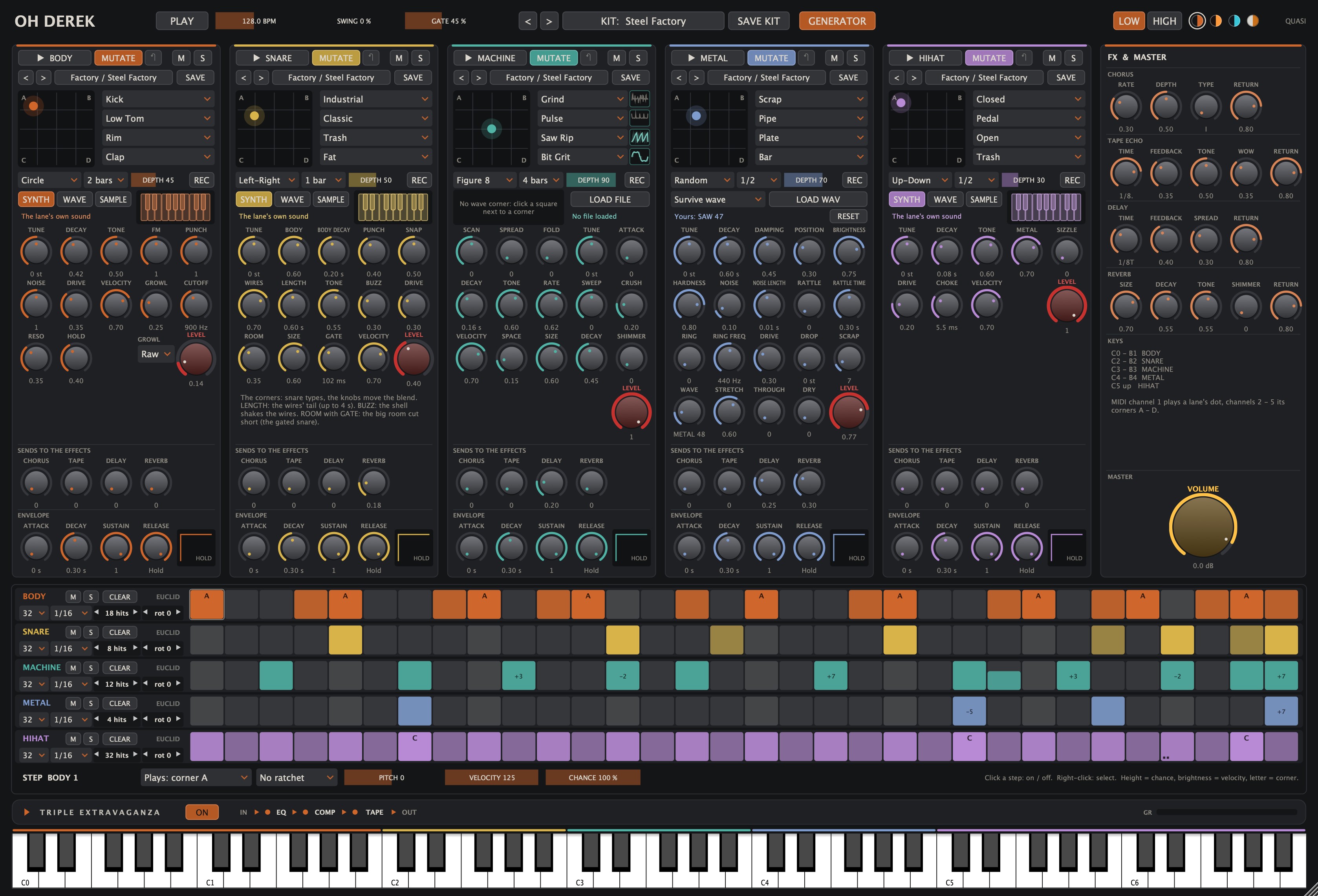
Five lanes side by side: BODY (kicks, toms, rims), SNARE, MACHINE (noise, grinding, pulses), METAL (bars, plates, pipes, bells, scrap) and HIHAT. Each lane has four sounds on a vector pad and its own row in the sequencer at the bottom. FX & MASTER on the right holds the shared effects. Under the sequencer the Triple Extravaganza strip (the master chain) and a keyboard close the window. A whole setup (every lane, the pattern, the effects, the tempo) is a kit.
Quick start
- Load Oh Derek on an instrument track and press play in your DAW, or click PLAY in Oh Derek.
- Pick a kit with the arrows next to KIT, or click the kit name for the full list.
- Drag the dot on a lane's pad while it plays: the drum morphs between its four corner sounds.
- Click steps in the sequencer to add or remove hits.
- Out of ideas? Click GENERATOR, pick a style and click GENERATE.
- Keep it: SAVE KIT stores the whole setup under a name.
Top bar

- PLAY
- Starts and stops the sequencer. In a DAW that is playing, Oh Derek follows the DAW instead.
- BPM
- The tempo of Oh Derek's own clock. Drag it, or double-click to type. A playing DAW's tempo always wins.
- SWING
- Plays every second step a little later: from straight to a heavy shuffle.
- GATE
- How long a step holds its lane's envelope before the release. Short: tight hits. Long: notes that sustain.
- KIT
- The whole Derek: every lane, the effects, the tempo and the pattern. Arrows for the previous and next kit; click the name for the list.
- SAVE KIT
- Saves everything as your own kit.
- GENERATOR
- A new Derek from a few choices. See GENERATOR.
- VOL
- The volume of the whole Derek, before the output limiter. Double-click for 0 dB. Changing kits leaves it as it is.
- LOW · HIGH
- Quality. LOW is lighter on the computer and sounds the same at 44.1 and 48 kHz. HIGH is for fast computers and high sample rates.
- Colour dots
- The colour theme. Only the look changes.
How a lane works
All five lanes are built the same way, top to bottom. This is BODY; the others only differ in their sound knobs.
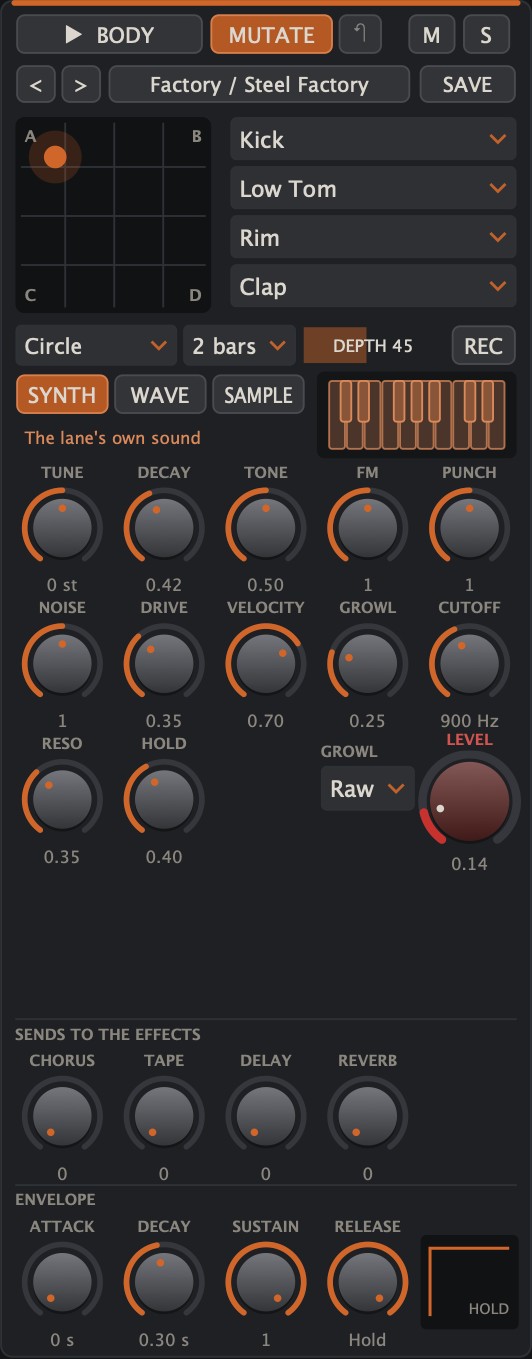
- ▶ name
- Plays the lane once, so you can hear it on its own.
- MUTATE · ↰
- A new sound for this lane: its knobs, corners and dot shuffled (METAL also gets a new material). The arrow undoes the last Mutate.
- M · S
- Mute this lane, or solo it (only soloed lanes play). Alt-click S to solo this lane alone.
- Preset row
- Sounds for this lane only. Arrows step through them; click the name for the list (Init, your presets, Save as…, the folder). SAVE keeps the lane's sound as a preset.
- Vector pad
- Four sounds sit at the corners: A and B on top, C and D below. Drag the dot between them; in a corner you hear that sound, in between a blend. Pick each corner's sound in the four lists next to the pad.
- Motion row
- Lets the dot move by itself, in time with the song. The first list is the path (Off, Circle, Figure 8, Spiral, Lissajous, Square, Random…), then how long one cycle takes (for example 1 bar), and DEPTH, how far it moves. REC: switch it on and draw a path on the pad with the mouse; it loops from then on.
- SYNTH · WAVE · SAMPLE
- What makes the sound (BODY, SNARE and HIHAT). Synth: the lane's own drum synth. Wave: its oscillator plays a built-in wave (click the picture to choose). Sample: your own sound file; LOAD it (WAV or AIFF, up to 4 s). It is kept in the project.
- Sound knobs
- Different for every lane; see below. LEVEL (the red knob) is the lane's volume.
- Sends
- How much of this lane goes to the CHORUS, TAPE echo, DELAY and REVERB in FX & MASTER.
- Envelope
- ATTACK, DECAY, SUSTAIN, RELEASE: the shape of each hit while a step (or a key) holds. RELEASE at its top is Hold: the hits ring out naturally.
BODY — kicks, toms and rims
FM drums with a growling filter. The corners are drum types: Kick, Snare, Low Tom, Rim, Clap and more.
- TUNE
- Pitch in semitones.
- DECAY
- How long the drum rings.
- TONE
- Darker or brighter.
- FM · PUNCH · NOISE
- More or less of each part than the corner sounds have (1 = as they are). FM: metallic bite. PUNCH: the click of the attack. NOISE: the rattle on top.
- DRIVE
- Saturation.
- VELOCITY
- How much soft and hard steps differ. 0: every hit the same.
- GROWL
- Sends the drum through a resonant filter that feeds back on itself: dirt, weight, a roar. CUTOFF and RESO tune that filter, HOLD lets it ring longer. The Raw / Fat switch: Raw is sharp and jumps an octave down when pushed, Fat is darker and thicker.
SNARE — shell, crack and wires
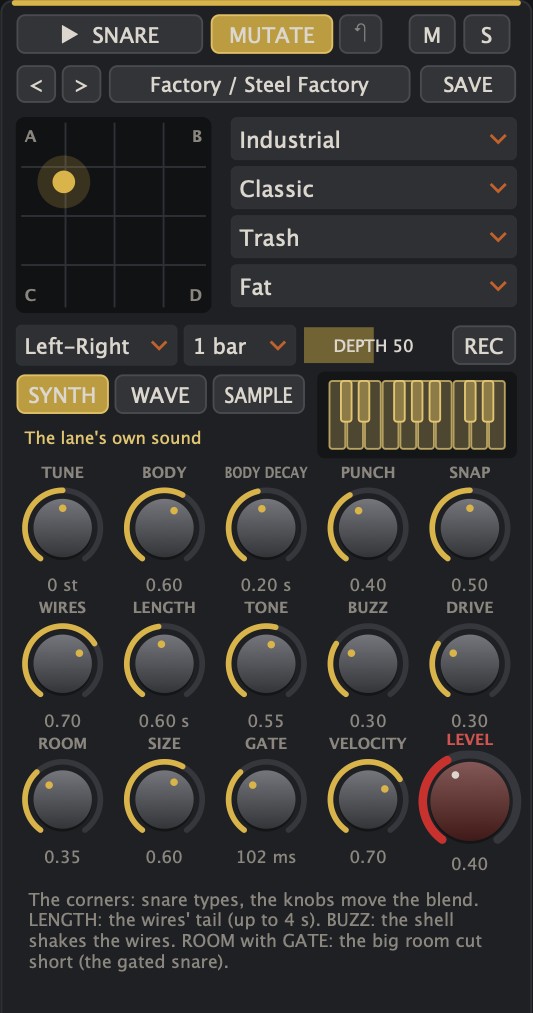
- TUNE
- Pitch of the whole snare.
- BODY · BODY DECAY
- How much of the drum shell you hear, and how long it rings.
- PUNCH · SNAP
- The thump of the start, and the sharp crack of the stick.
- WIRES · LENGTH
- The rattle of the snare wires, and how long it lasts (up to 4 s).
- TONE
- Darker or brighter wires.
- BUZZ
- The shell shakes the wires: a buzzy, loose snare.
- DRIVE
- Saturation.
- ROOM · SIZE · GATE
- A room around the snare and how big it is. GATE cuts the room short: the classic gated snare.
- VELOCITY
- How much soft and hard steps differ.
MACHINE — textures between the hits
Steam, grinding, pulses, squeals and wave blips. The corners are kinds of texture; click the small square next to a corner to give it a wave instead, or LOAD FILE to make waves from your own sound.
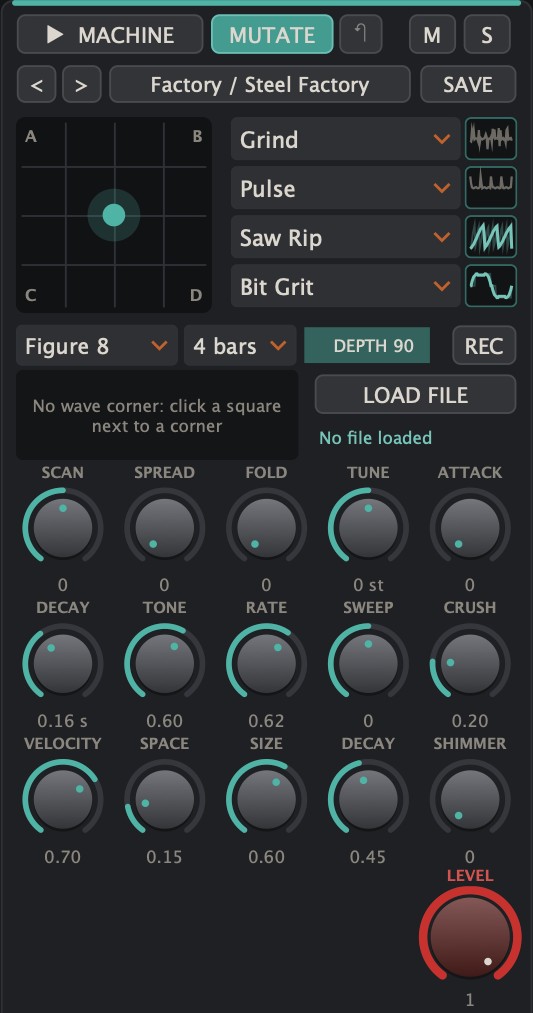
- SCAN
- For wave corners: the wave moves forward or backward through its shapes during the hit.
- SPREAD
- Three slightly detuned copies of the wave: wider and thicker.
- FOLD
- Folds the wave over: harsher, more harmonics.
- TUNE · ATTACK · DECAY · TONE
- Pitch, how the sound starts, how long it lasts, darker or brighter.
- RATE
- The speed of the grinding and the pulses.
- SWEEP
- The pitch and rate glide down (left) or up (right) during the hit, up to three octaves.
- CRUSH
- Bitcrusher: from clean to lo-fi grit.
- SPACE · SIZE · DECAY · SHIMMER
- The lane's own reverb, for long tails: how much, how big, how long, and a sparkling octave on top.
- VELOCITY
- How much soft and hard steps differ.
METAL — things that ring
A bank of resonators, like a real object struck. The corners are materials: Bar, Plate, Pipe, Bell, Scrap, and Yours, a material made from a Survive wave or a sound file you load (LOAD WAV; RESET forgets its mutations).
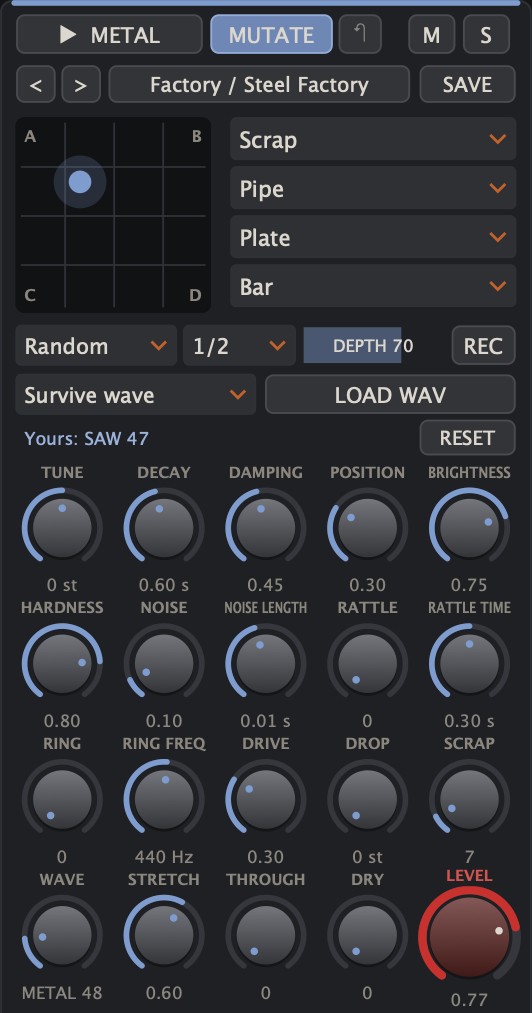
- TUNE · DECAY
- Pitch, and how long the metal rings (up to 6 s).
- DAMPING
- High partials die faster: from a bright ring to a dull clank.
- POSITION
- Where it is struck: the centre or the edge changes which partials sound.
- BRIGHTNESS · HARDNESS
- The colour of the ring, and how hard the hammer is (soft mallet to steel).
- NOISE · NOISE LENGTH
- A burst of noise in the strike, and how long it lasts.
- RATTLE · RATTLE TIME
- A series of tiny hits: chains, springs, loose parts.
- RING · RING FREQ
- Ring modulation: a metallic, bell-like clang at the chosen frequency.
- DRIVE
- Saturation.
- DROP
- The pitch falls after the strike, up to two octaves: like a tension-drum.
- SCRAP
- A number that picks a different random scrap shape.
- WAVE · STRETCH
- For the Yours material: which wave it is made from, and how far its partials are spread.
- THROUGH · DRY
- With a loaded sound: THROUGH lets the sound itself strike the metal; DRY adds the sound as it is.
HIHAT — closed, open and everything between
The corners are hat types: Closed, Pedal, Open, Sizzle, Trash and more.
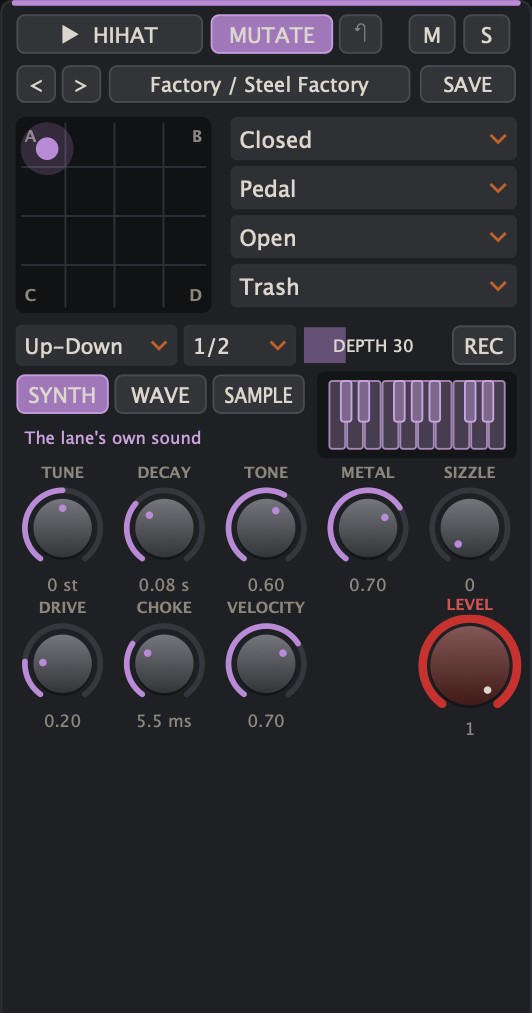
- TUNE · DECAY · TONE
- Pitch, length and colour.
- METAL
- The metallic part of the hat (six oscillators) against its noise.
- SIZZLE
- A loose, sizzling rattle.
- DRIVE
- Saturation.
- CHOKE
- How fast a new hit cuts off the one still ringing, like closing the hi-hat on an open hat. Off at the top.
- VELOCITY
- How much soft and hard steps differ.
FX & MASTER — the shared effects
Every lane sends to these with its own SEND knobs. RETURN is how loud each effect comes back.
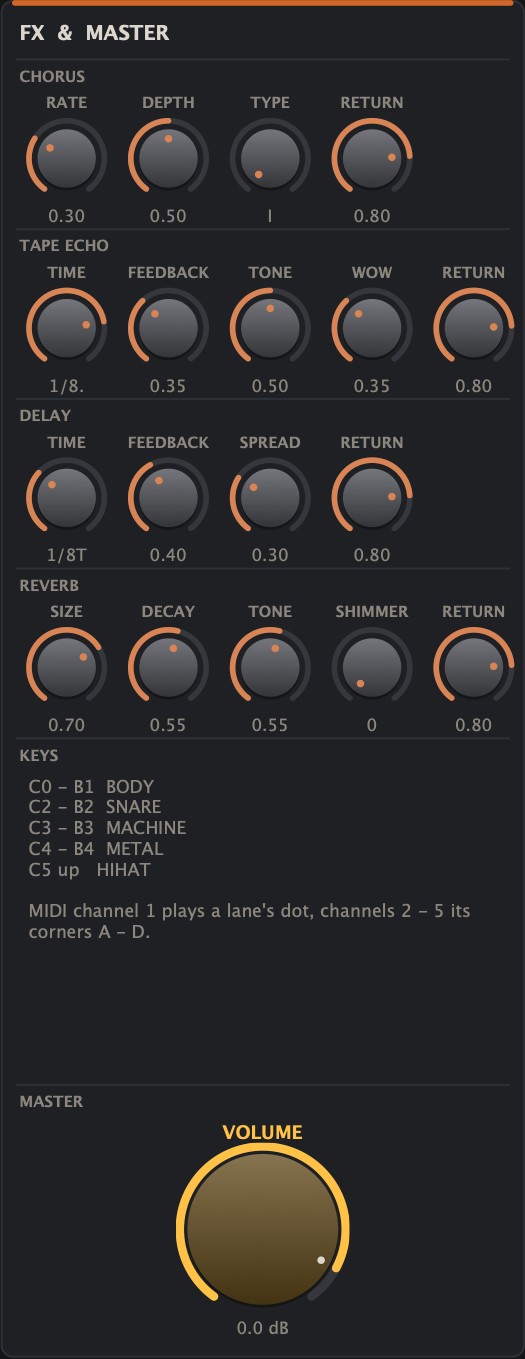
- CHORUS
- RATE, DEPTH and TYPE (I, II, or both, like a classic string-machine chorus).
- TAPE ECHO
- An echo with the colour of tape: TIME (in note values), FEEDBACK (how many repeats), TONE and WOW (the wobble of the tape).
- DELAY
- A clean stereo delay: TIME, FEEDBACK and SPREAD (how far the repeats are spread left and right).
- REVERB
- SIZE, DECAY, TONE and SHIMMER (a sparkling octave on the tail).
- KEYS
- A list of which keys play which lane (C0 – B1 BODY, C2 – B2 SNARE, and so on).
- VOLUME
- The loudness of the whole kit, after the master chain. It is not saved in a kit.
TRIPLE EXTRAVAGANZA — the master chain
Three studio-style processors in a row, built into Oh Derek and applied to the whole kit after the effects: a passive EQ, an optical compressor and tape. It is on when you first load Oh Derek.

The strip is always there, between the sequencer and the keyboard. It shows the chain at a glance: the switch for the whole chain, the three blocks in the order the sound passes through them (a dot lights when a block works) and, at the far right, how much the compressor is pressing the sound down. Click the strip to open the full chain; the window grows and the keyboard moves down.

- ON (strip)
- The whole chain, on or off. Off: Oh Derek sounds as it does without the chain.
- ON (each block)
- Switches that one block off and on. A block that is off lets the sound through untouched.
- < and >
- Move a block one place to the left or right. The sound passes through the blocks from left to right, and the order changes the result: tape before the compressor sounds different from tape after it. Six orders are possible.
1 PASSIVE EQ
- LOW FREQ · LOW BOOST · LOW ATTEN
- Pick a low frequency (20, 30, 60 or 100 Hz), then boost it, cut it, or both: turning BOOST and ATTEN up together at the same frequency gives a fuller, tighter bottom than either alone.
- HIGH FREQ · HIGH BOOST · BANDWIDTH
- Pick a high frequency (3, 4, 5, 8, 10, 12 or 16 kHz) and boost it. BANDWIDTH sets how wide the boost is.
- ATTEN FREQ · HIGH ATTEN
- Cuts the top end from 5, 10 or 20 kHz: takes off the fizz without dulling everything.
2 OPTO COMP
- REDUCTION
- How hard the compressor squeezes. It reacts smoothly and lets go slowly, so the sound gets steadier without pumping. The GR bar under the knobs shows the reduction, up to 20 dB.
- GAIN
- Makes up the level lost to compression. At the starting position (23) the chain is as loud as without it; turn it up to bring the compressed sound forward.
- MODE
- Compress: gentle and musical. Limit: firmer, for peaks you want held down.
3 TAPE
- INPUT
- How hard the sound hits the tape, from −12 to +24 dB. Low: clean. High: warmth and soft saturation, and the lows thicken.
- OUTPUT
- The level after the tape, from −24 to +12 dB. Use it to take the level back down when INPUT is high.
- SPEED
- 15 IPS: clean and open. 7.5 IPS: softer on top, with more tape character.
- EQ
- NAB or CCIR: the two standard tape equalisations. They differ slightly in how lows and highs are balanced.
- Moving a block with < or > and changing the tape's SPEED or EQ mute the sound for about 35 milliseconds while the chain re-arranges itself. Set them up before you play; they are not for automation. The knobs and the ON switches can be moved any time.
- The chain's settings are saved with a kit you save and with your DAW project; the open or closed state of the strip stays as you left it when you change kit. The factory kits, and kits saved before the chain existed, do not touch the chain.
- Oh Derek reports the chain's small delay (about 1.5 ms) to your DAW, so it stays in time.
- Boosts and a high INPUT can push the level above full scale. Turn OUTPUT or VOLUME down if your DAW shows clipping.
Sequencer
One row per lane. Each row can have its own length and speed, so lanes drift apart and meet again: polyrhythm, the easy way.

- Steps
- Click a step to switch it on or off. Right-click to select it and edit it below. A step's height shows its chance, its brightness its velocity, and a letter which corner it plays.
- Length
- The first box: how many steps this row has (up to 32). Try 16 on BODY, 12 on METAL and 7 on MACHINE.
- Rate
- The second box: step length (1/16, triplets, 1/32…).
- EUCLID hits · rot
- Spreads the chosen number of hits as evenly as possible over the row (a quick way to great rhythms); rot turns the pattern round.
- M · S · CLEAR
- Mute, solo, and empty the row.
- STEP editor
- For the selected step: Plays the dot or one corner (A to D), a ratchet (2, 3 or 4 fast hits in one step), PITCH (±12 semitones), VELOCITY and CHANCE (how often it plays). One pattern, endless variation.
GENERATOR — a new Derek from a few choices
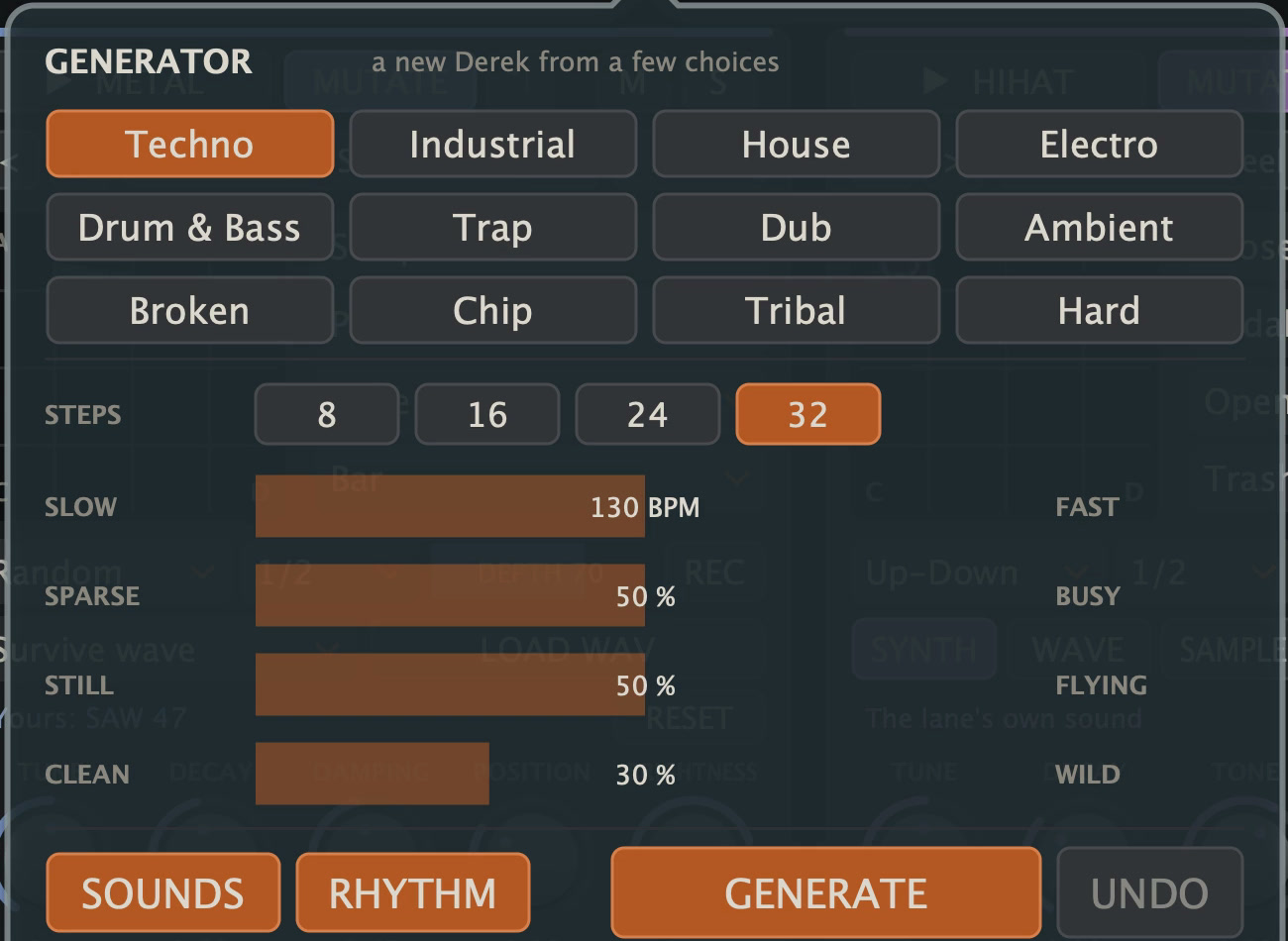
- Style
- Twelve styles: Techno, Industrial, House, Electro, Drum & Bass, Trap, Dub, Ambient, Broken, Chip, Tribal, Hard. Each brings its own tempo, grooves, sounds and effects.
- STEPS
- How long the new pattern is: 8, 16, 24 or 32 steps.
- SLOW–FAST
- The tempo. A style sets its own; move it afterwards if you like.
- SPARSE–BUSY
- How many hits: few and open, or full.
- STILL–FLYING
- How much the dots move around their pads.
- CLEAN–WILD
- Clean, or strange: odd corners and waves, chances, ratchets, more drive.
- SOUNDS · RHYTHM
- What GENERATE may change. Both on: everything. SOUNDS only: new sounds, same pattern. RHYTHM only: a new pattern, same sounds.
- GENERATE · UNDO
- A new Derek; click again for another. UNDO goes back to the one before.
Playing from MIDI
- Keys
- C0–B1 play BODY, C2–B2 SNARE, C3–B3 MACHINE, C4–B4 METAL, C5 and up HIHAT. The key sets the pitch.
- Channels
- MIDI channel 1 plays a lane's dot. Channels 2 to 5 play its corners A to D directly.
- In a DAW
- Use the sequencer, MIDI notes from your DAW, or both together.
Recipes
Industrial in a minute
- GENERATOR: Industrial, BUSY around 70 %, GENERATE until you like it.
- BODY GROWL up, Raw.
- Open the Triple Extravaganza strip and turn the tape up a little for everything.
Polyrhythm
- BODY row 16 steps, METAL 12, MACHINE 7.
- EUCLID: 4 hits on BODY, 5 on METAL, 3 on MACHINE.
- Listen to them drift apart and meet again.
A drum that never repeats
- On BODY, Motion Random, DEPTH about 50.
- Lower CHANCE on a few steps.
- Ratchet x2 on the last step of the bar.
Metal from your own sound
- METAL: LOAD WAV (a voice, a hit, anything).
- Move the dot to the Yours corner.
- Bend it with DAMPING, DROP and SCRAP; THROUGH to let the sound strike it.
Questions
- Nothing plays when I press PLAY.
- Is a lane muted, or another one soloed? Check M and S on the lanes and in the sequencer rows.
- The tempo won't change.
- Your DAW is playing: its tempo always wins.
- Hits ring on too long.
- The lane's RELEASE is on Hold. Turn it down, or shorten GATE in the top bar.
- Will my loaded samples travel with the project?
- Yes. A sound you load into a lane is kept inside your DAW project, so it opens on another computer too.
- GENERATE changed my sounds, I only wanted a new beat.
- Switch SOUNDS off, keep RHYTHM on.
- Oh Derek is quieter than before.
- The Triple Extravaganza chain is on by default, and its compressor holds the kit down by a few dB. Switch the chain off with the ON in the strip, or open it and set each block to taste.
- The demo went silent.
- The 14 days are over. Your projects open unchanged in the full version.