Swaroog manual
A fat two-oscillator analog synth with a sequencer that writes for you and a drum machine on board. Here is what every knob and button does, in plain words.
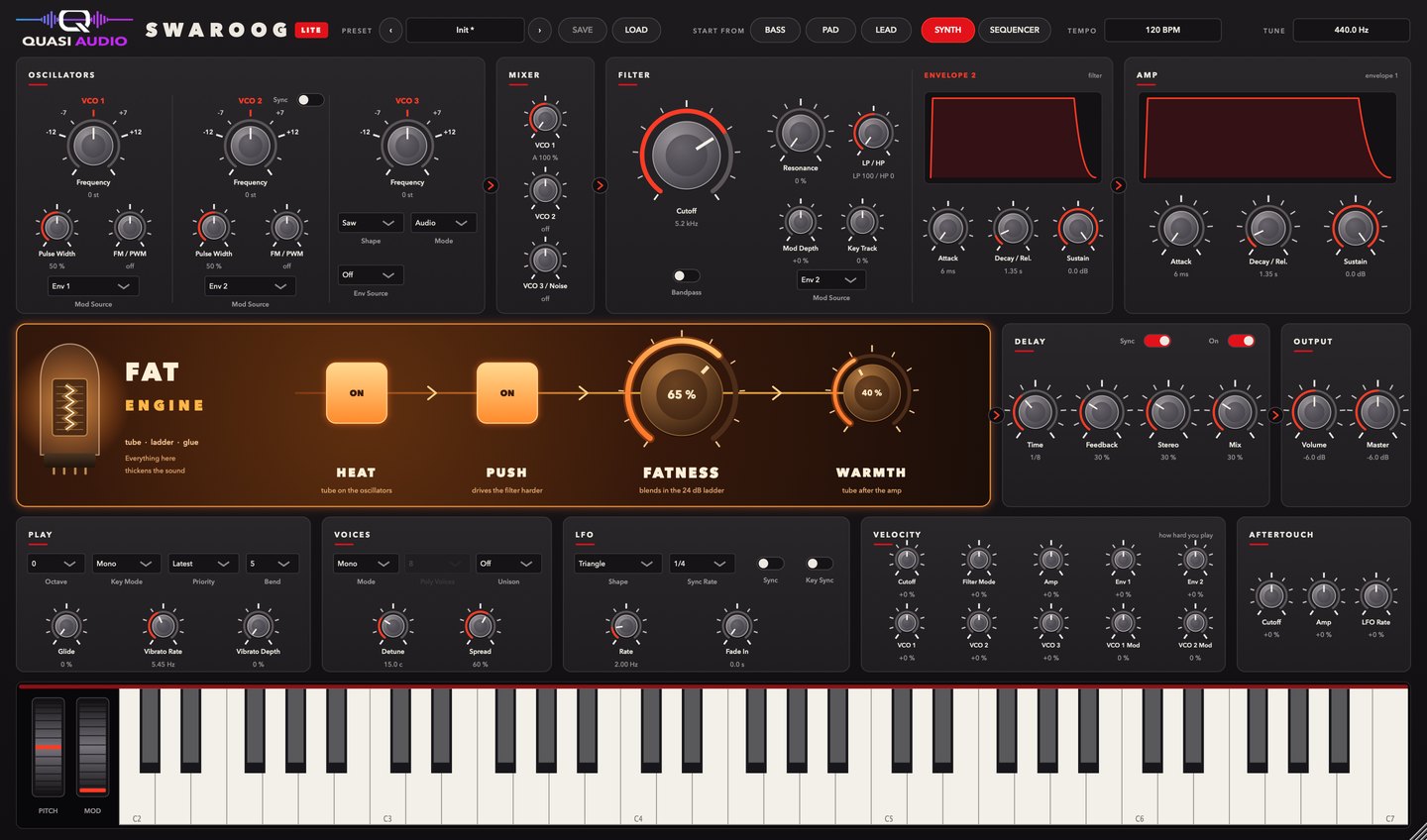
Two pages, switched at the top: SYNTH and SEQUENCER. On SYNTH the oscillators make the sound, the mixer blends them, the filter and the envelopes shape it, the FAT engine thickens it, then delay and output. Below: how you play it. On SEQUENCER: the slots, Twist It, the roll and BEAT.
Quick start
- Open Swaroog and pick your audio and MIDI device under Options → Audio/MIDI Settings.
- Click the preset name and choose a sound, or press BASS, PAD or LEAD.
- Go to SEQUENCER, pick a sequence next to SAVE, and press PLAY. It starts at once.
- Press SURPRISE ME under the slots. Your pattern turns into a new idea. AGAIN for another, KEEP when you love it.
- Press BEAT and pick a ready beat with the arrows. Turn Comp for punch.
- Back on SYNTH, switch on HEAT and turn up FATNESS.
Lite and the DAW version
Swaroog Lite is the free app. It plays everything: every knob, the FAT engine, the sequencer, Twist It, BEAT, 132 sounds, 16 sequences and 73 beats, with no time limit. When you close it, your session is kept and comes back next time.
In Lite the two SAVE buttons are grey. Saving your own sounds and your own sequences comes with Swaroog for your DAW (AU, VST3, CLAP), which you can try free for 15 days.
Top bar and presets

- PRESET ‹ ›
- Step through Init, BASS / PAD / LEAD, the 132 factory sounds and your own. Click the name for the menu: Bass, Lead, Pad, Brass, Strings, Keys, Pluck, Seq, FX and Chords. All play at the same level. A * after the name means you changed something.
- SAVE · LOAD
- Save your sound or load a preset file. SAVE is in the DAW version.
- START FROM
- BASS, PAD and LEAD are simple starting points to shape your own sound.
- SYNTH · SEQUENCER
- The two pages. The sound and the sequence play on whichever page you look at.
- TEMPO · TUNE
- The tempo of the sequencer, BEAT, the delay and the LFO sync, and the tuning of A. Presets never change them, and they never change your Master either.
Oscillators
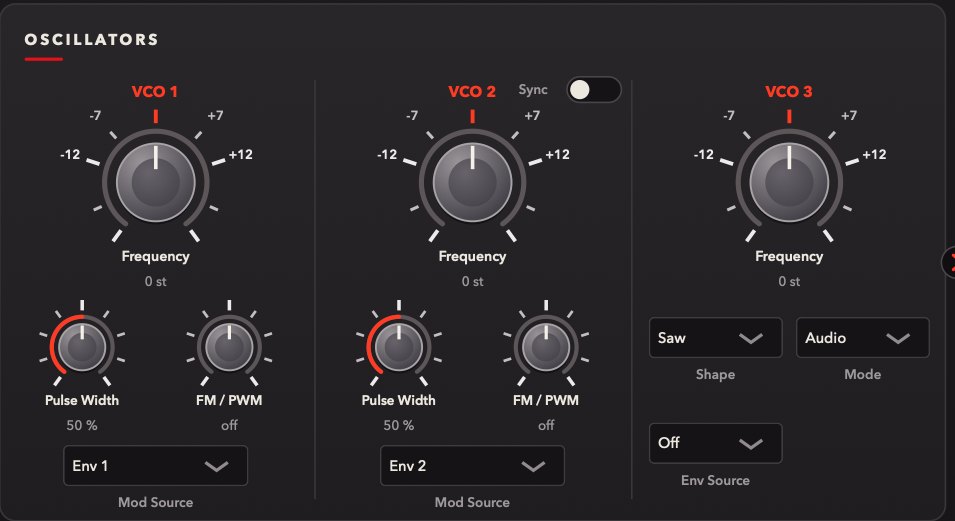
- Frequency
- Tunes each oscillator up or down by up to an octave and more.
- Pulse Width
- Changes the hollow pulse sound, from thin to square.
- FM / PWM
- Left moves the pitch, right moves the pulse width, from the Mod Source under it: an envelope, VCO 3 or the LFO.
- Sync
- Locks VCO 2 to VCO 1 for the hard, tearing sync sound. Sweep VCO 2 Frequency to hear it.
- VCO 3
- A third oscillator (saw, sine or square) to hear in the mixer or to modulate the others. In LFO mode it becomes a second LFO.
Mixer and filter
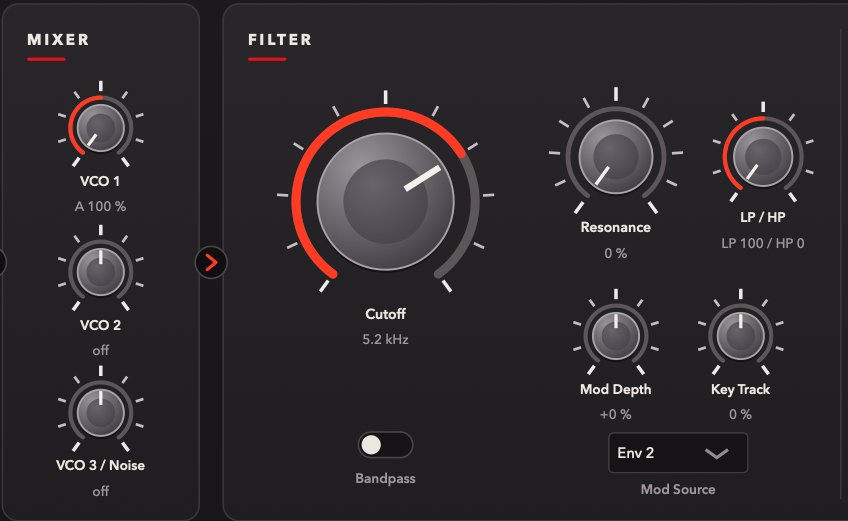
- MIXER
- One knob per source: left for the first wave (saw, the VCO 3 wave), right for the second (pulse, noise). The middle is off.
- Cutoff
- Opens and closes the sound. The knob that changes it most.
- Resonance
- Makes the filter sing at the cutoff.
- LP / HP · Bandpass
- LP / HP glides from low-pass through notch to high-pass. Bandpass switches to band-pass.
- Mod Depth · Key Track
- How much the Mod Source (Env 2, VCO 3 or LFO) moves the cutoff, left down, right up. Key Track makes higher notes brighter.
Envelopes
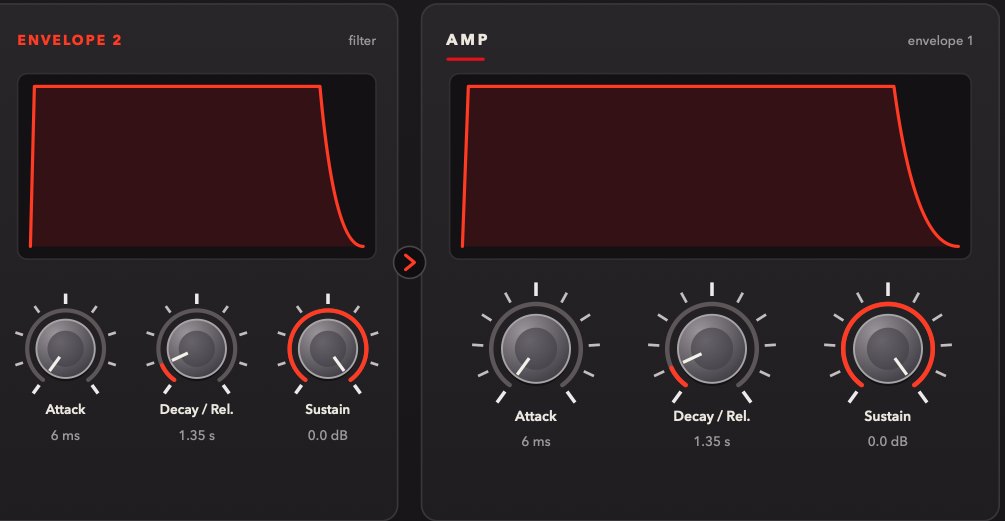
- ENVELOPE 2 · AMP
- Envelope 2 shapes the filter, AMP the volume of each note. The pictures show the shape.
- Attack
- How long the note takes to rise.
- Decay / Rel.
- How long it falls to Sustain, and how long it rings after you let go.
- Sustain
- The level while you hold the key.
The FAT engine
Everything here thickens the sound. Start with all off and add one at a time.

- HEAT
- Puts a tube on the oscillators. Rich, round, a little gritty.
- PUSH
- Drives the filter harder, so resonance growls instead of whistles.
- FATNESS
- Blends in a 24 dB ladder filter for a rounder, fatter low end.
- WARMTH
- A tube after the amp. Turn it up and the sound gets thicker and louder at the same time.
- Glue
- Always on, no knob: a glue stage after the synth that follows your envelopes and holds every note together.
Delay and output
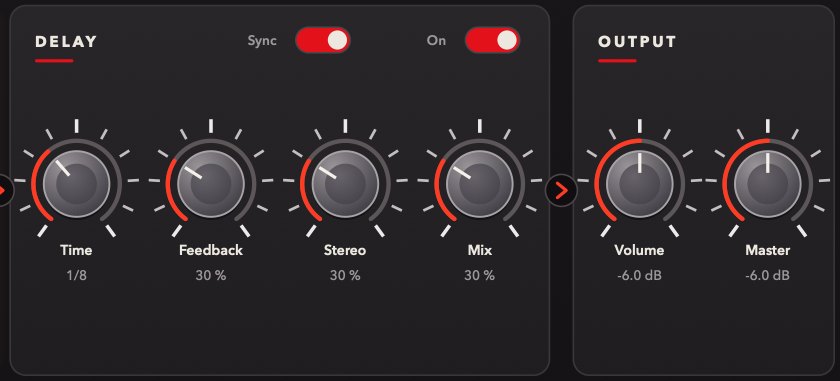
- DELAY
- Switch it On, then set Time, Feedback (how many echoes), Stereo (how far they jump left and right) and Mix. Sync sets Time in notes of the tempo.
- Volume
- The level of the sound. Saved with presets.
- Master
- Your overall level. Presets never touch it.
Play, voices, LFO

- PLAY
- Octave shifts the keyboard. Key Mode: Mono restarts the envelopes on every note, Legato glides connected notes on. Priority picks which held note wins. Bend is the pitch wheel range. Glide slides between notes, Vibrato Rate / Depth set the vibrato; the mod wheel adds more.
- VOICES
- Mono plays one note, Poly up to 8 (Poly Voices). In Mono, Unison stacks 2 to 4 voices; Detune spreads their tuning, Spread their stereo place.
- LFO
- A slow wave for movement. Shape, Rate, Sync to the tempo with Sync Rate, Key Sync restarts it on each note, Fade In lets it grow in slowly.
Velocity and aftertouch
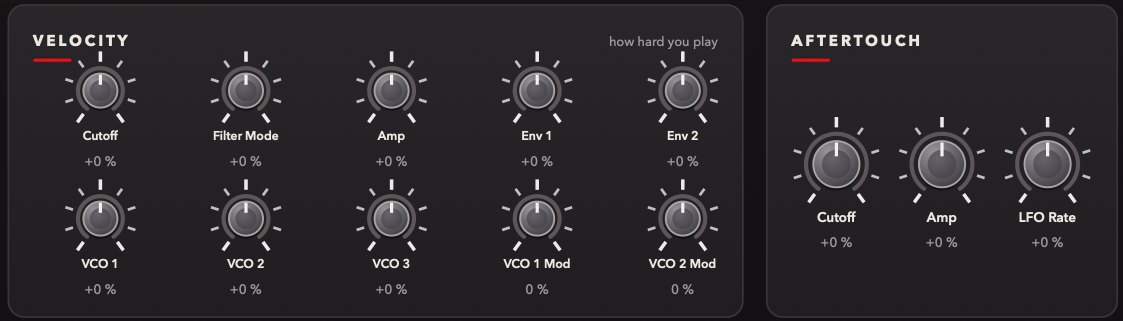
- VELOCITY
- What your playing strength changes: cutoff, filter mode, amp, envelopes, oscillator pitches and FM / PWM amounts.
- AFTERTOUCH
- What pressing harder on a held key changes: cutoff, amp and LFO rate. In the middle a knob does nothing.
The sequencer
Press SEQUENCER at the top. 32 slots, each a pattern of up to 32 steps.

- PLAY
- Plays the slot chosen. With Always on it starts at once and the keys you press move it to their key. With Always off it plays while you hold a key.
- REC
- Stopped: the notes you play go in one by one from the blue HEAD. While it plays: what you play goes in live, to the nearest step. REST puts a pause in the next step.
- NEXT
- On each pass, the next slot of the RANGE plays; after the last, the first again. Off: the chosen slot repeats.
- Clock · Rate
- What drives the steps: the tempo (Clock), the LFO, or your keys (Key: one step per key). Rate is the step length, 1/16 by default.
- Keep
- On: changing the sound leaves your sequence alone.
- Sequence ‹ › · SAVE
- 16 factory sequences, and your own ones after them. SAVE keeps every slot, the sequencer's settings, Tempo and the whole BEAT. SAVE is in the DAW version.
- Slots A1 to B16
- Click one to edit it. Drag one onto another to copy it. The bar under them is the RANGE for NEXT: drag its ends, double-click for all 16.
The roll
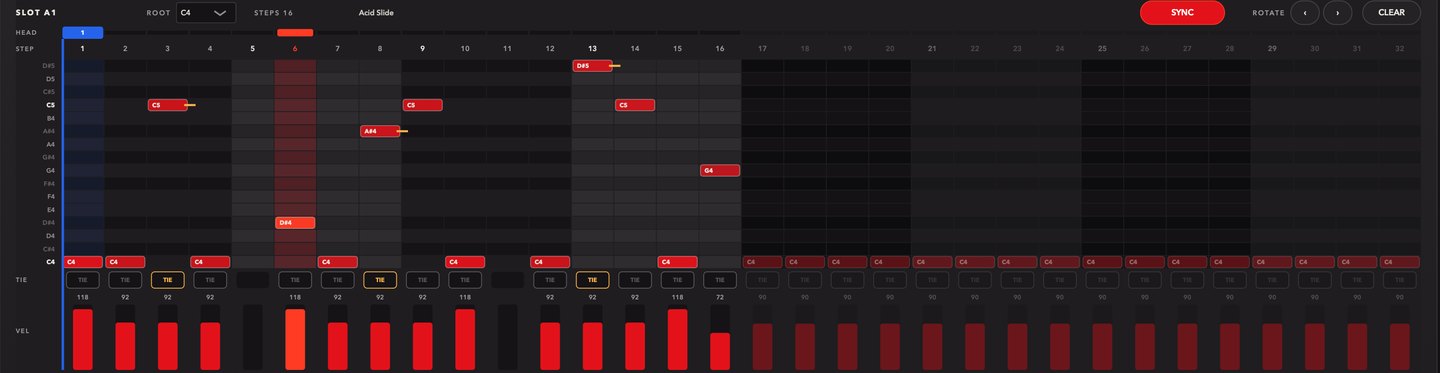
- ROOT
- The key the pattern plays in. Turn it up and the whole pattern moves up.
- STEPS
- How long the pattern is, 1 to 32 steps. Click a step number to end the pattern there.
- Notes
- Click in the roll to place a note on a step. Drag a note to move it, drag its right end to make it longer. Hold the right button and drag to see higher or lower notes.
- TIE
- Joins a step to the next one, so the note holds on.
- VEL
- The bars under the steps: how hard each note plays.
- SYNC · ROTATE · CLEAR
- SYNC makes the roll follow the slot that plays. ROTATE shifts the steps left or right. CLEAR starts the slot again.
Twist It
Algorithms that write for you. Twist It works on the slot you see.

- SURPRISE ME
- A new twist of your pattern. Twist It picks what to change by itself.
- RHYTHM · MELODY · MOTIF
- The three things it can change: when notes play, which notes, and the little phrases they make. Switch each on or off, and pick a recipe next to it or leave it on Auto.
- Presets
- 18 ready twists from gentle to wild: Breathe, Neighbours, Halfway Happy, Off the Grid, Lazy Sunday, Sequence, Riff It, Stutter, New Colour, Wide Leaps, Upside Down, Backwards, Markov Walk, Swap Shop, Spin, Machine Gun, Drunk Robot, Total Chaos.
- KEEP PITCH · CONTOUR · RANGE · ENDS
- What must stay: only your notes, the up and down of your line, its lowest and highest note, or the first and last note.
- AMOUNT
- How far it moves the pattern. 0 is not at all.
- AGAIN · S · seed
- AGAIN and S give another result with the same settings. The seed number gives the same twist every time; double-click it to type one.
- DIV 2 · DENSITY
- DIV 2 cuts the space between notes in two, for faster runs. DENSITY plays fewer notes; the ones on the beat stay longest.
- KEEP · RESET · UNDO
- KEEP makes what you hear the new start. RESET goes back to the slot before its first twist. UNDO takes one step back.
BEAT
Kick, snare and hat in sixteenths of the tempo, in step with the sequencer.

- Steps
- Click to set or clear a hit, drag along a drum to go on. Right-click a hit for accent, normal or soft.
- S · M
- Solo or mute one drum.
- BEAT · Beat ‹ ›
- BEAT switches the drums on. The arrows and the name pick one of 73 ready beats in 18 styles.
- Tune · Tone · Decay · Level
- For the drum chosen on the left: pitch, brightness, length and level.
- Comp
- Squeezes all three drums together for punch. It starts gently, so turn it well up before it gets wild.
- Volume
- The level of the whole drum kit against the synth.
MIDI Learn
Right-click a knob, or PLAY, REC and NEXT, and choose MIDI Learn, then move a control on your MIDI controller. They are linked. Right-click again to Forget one link or all of them.
Recipes
- Instant acid
- Sequence Acid Slide, sound from the Bass category, PUSH on, Resonance up, then sweep Cutoff while it plays.
- Never the same twice
- Twist It preset Lazy Sunday, AMOUNT about 40 %, KEEP PITCH on. Press AGAIN every few bars and KEEP the one you like.
- Song part in a minute
- Twist A1 into A2, A3 and A4, set RANGE to A1 to A4, switch NEXT on and add a House beat.
- Huge bass
- BASS, HEAT on, FATNESS 70 %, WARMTH 40 %, Unison 2 with a little Detune.
Questions
- I hear nothing.
- Check the device under Options → Audio/MIDI Settings, and that Volume and Master are not at the bottom.
- The sound crackles.
- Set a buffer of 128 samples or more in the audio settings.
- Why is SAVE grey?
- You are in Swaroog Lite. Saving your own sounds and sequences comes with Swaroog for your DAW.
- Some knobs are grey.
- They do nothing in the current mode, for example Unison in Poly.