
Stein Strings manual
Everything on the panel, in plain words. Read it top to bottom once, or jump to the part you need.
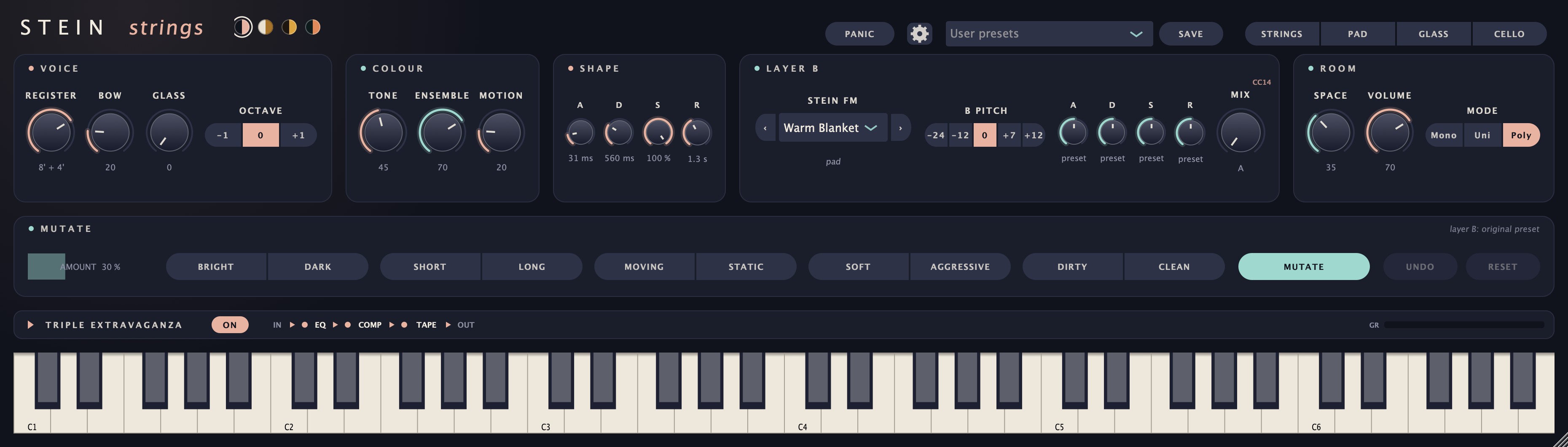
Stein Strings is two instruments in one. Layer A is the string machine: VOICE, COLOUR and SHAPE. LAYER B is an FM synth with 124 sounds that plays under the strings; the MIX knob blends the two, and MUTATE reshapes layer B for you. ROOM puts both in a space. The Triple Extravaganza strip above the keyboard is a master chain (EQ, compressor, tape) that everything passes through last.
Quick start
- Load Stein Strings on an instrument track in your DAW and hold a chord.
- Pick a starting point: STRINGS, PAD, GLASS or CELLO in the top right corner.
- Turn ENSEMBLE and TONE while you play: from a thin, dry section to a wide, warm wall of strings.
- Bring in layer B: turn MIX towards the middle, then pick a sound under STEIN FM with the arrows.
- Try MUTATE: choose a direction, such as DARK or MOVING, and click MUTATE. Click UNDO if you liked the previous one better.
- Keep it: click User presets, type a name and press SAVE.
Working with the panel
- Turn a knob
- Drag up or down. The value shows under it, in the unit that makes sense (ms, s, %, or just 0–100).
- Back to default
- Double-click a knob.
- Not sure what it does?
- Hold the mouse over any control: a short tip pops up.
- MIDI Learn
- Right-click any knob or switch (Ctrl-click on a Mac trackpad), choose MIDI Learn, move a knob on your controller. A small CC label then shows the knob is assigned.
- Bigger or smaller
- Drag the bottom-right corner of the window.
- Colours
- The four dots next to the logo switch the colour theme (Ink, Ivory, Walnut, Lagoon). Only the look changes.
- Master chain
- The Triple Extravaganza strip sits above the keyboard. Click it to open the full chain (the keyboard moves down) and click it again to close it. More under Triple Extravaganza.
- Keyboard
- The keys at the bottom play Stein Strings with the mouse.
Top bar

- PANIC
- Stops every note at once, sustain pedal included, and cuts what is still ringing (long release, reverb). For stuck notes.
- Gear
- Opens Settings: MIDI channel, pitch bend, tuning, MIDI Learn list, theme.
- User presets
- Your own sounds, both layers and the mutated layer B included. In the same list: delete the current preset or Show folder.
- SAVE
- Saves the current sound under a name. Enter confirms, Esc cancels.
- STRINGS · PAD · GLASS · CELLO
- Starting points for layer A: one click sets the string machine for that kind of sound, then you keep turning. Strings: the classic ensemble. Pad: slow, soft and wide. Glass: bright, bell-like shimmer. Cello: lower, with more bow.
VOICE — what the strings are made of
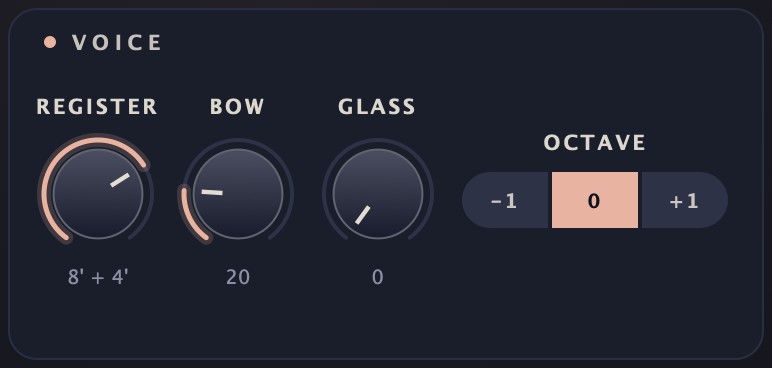
- REGISTER
- Like the footage stops on an organ. Left: 8′, the note as played, full and warm. Right: 4′, an octave up, brighter. In the middle both together (the readout shows 8′ + 4′).
- BOW
- A rough, lively start to every note, like a bow catching the string. Higher values also leave a light rasp in the sound.
- GLASS
- Bell-like, shimmering overtones above the strings that ring longer. Lovely for pads; a little goes a long way.
- OCTAVE
- Moves the whole keyboard one octave down or up.
COLOUR — warmth and width
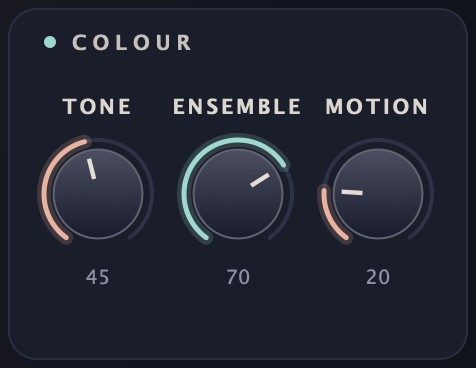
- TONE
- From warm and dark to bright and open. Low notes stay full and high notes stay soft whatever you choose, like a real instrument body.
- ENSEMBLE
- The heart of a string machine: a slow and a fast shimmer at once, spread wide in stereo. It turns a few oscillators into a whole section. Turn it down for a thinner, more direct sound.
- MOTION
- Gentle life: voices drift slightly apart, and vibrato fades in on held notes. Pads breathe.
SHAPE — how the strings rise and fall
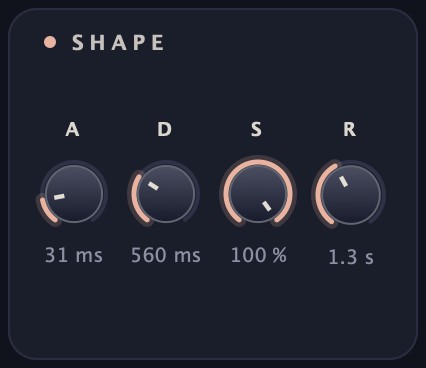
- A
- Attack: how the strings come in, from a direct hit to a very slow fade-in (up to about 8 s).
- D
- Decay: how fast they fall after the attack to the S level. You only hear it when S is below 100 %.
- S
- Sustain: the level while you hold the key. 100 % is the classic string machine: full level for as long as you hold.
- R
- Release: how long the strings fade after you let go (up to about 12 s).
Good to know: SHAPE is for layer A only. Layer B has its own A D S R in its section.
LAYER B — the FM sounds underneath
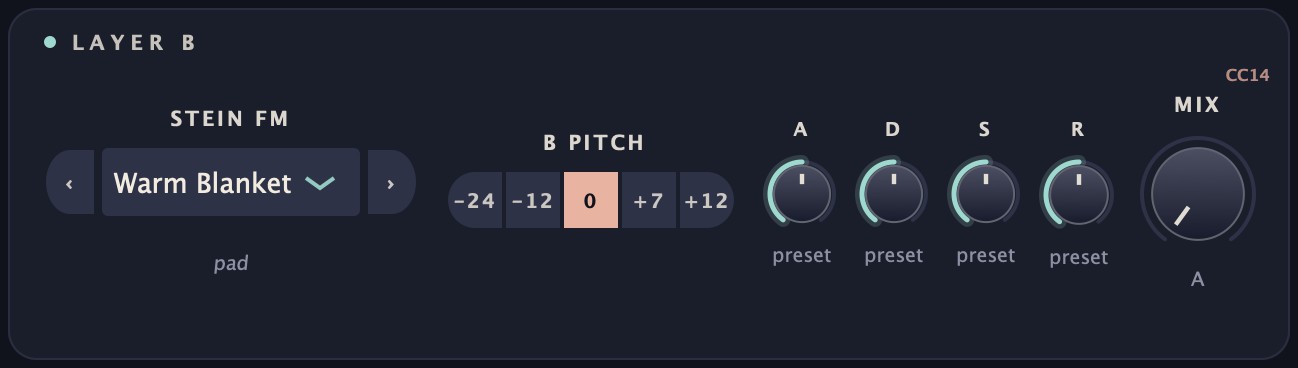
A full FM synth with 124 sounds from the original Stein: pads, choirs, organs, bells, brass and more. It plays the same notes as the strings, always in tune with them.
- STEIN FM
- The layer B sound. Use the arrows to step through them, or click the name for the full list. The small word under the name tells you what kind of sound it is (pad, bell, organ…).
- B PITCH
- Where layer B sits against the strings: two octaves down (−24), one octave down (−12), the same (0), a fifth up (+7) or an octave up (+12). An octave down under the strings gives weight; a fifth up gives an organ-like sparkle.
- A · D · S · R
- Layer B's envelope, relative to the chosen sound. In the centre (preset) it is as the sound was made. Left: faster or shorter, right: slower or longer (up to 8×). For S, left is lower and right is higher.
- MIX
- The blend of the two layers. Left (A): strings only. Right (B): layer B only. In between both, and the readout shows how much of each.
Good to know: with MIX fully left you don't hear layer B at all, and MUTATE seems to do nothing. Turn MIX up first.
ROOM — the space and the playing mode
- SPACE
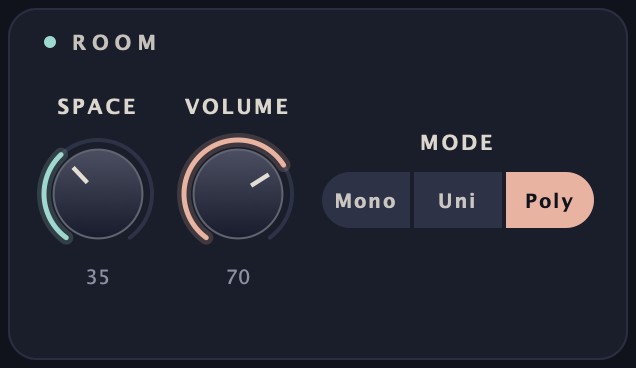
- Reverb, from a small room to a large cathedral.
- VOLUME
- Output level.
- MODE
- For both layers. Poly: chords, the usual for strings. Mono: one note at a time, notes tied together (layer B keeps its sound's glide). Uni: like Mono, with three detuned voices per note: a big, wide solo line.
MUTATE — reshape layer B in one click
Instead of editing FM by hand, tell Stein Strings which way you want layer B to go. It tries several variations, listens to them and keeps the best one.

- Directions
- Five pairs: BRIGHT / DARK, SHORT / LONG, MOVING / STATIC, SOFT / AGGRESSIVE (the attack) and DIRTY / CLEAN. Light up one side of any pair, or several pairs at once. Click again to turn a direction off. With none lit, MUTATE just makes a variation.
- AMOUNT
- How far one click goes. Default 30 %: small steps you can follow by ear. Drag it up for bigger jumps.
- MUTATE
- Makes a new variation of layer B in the chosen directions. Each click goes further from where you started.
- UNDO
- One step back. Click several times to walk back.
- RESET
- Layer B back to the sound as it was loaded. UNDO brings the mutated one back if you change your mind.
Good to know: the line on the right of the bar tells you where you are, for example layer B: original preset. Mutated sounds are saved with your project and in your user presets.
TRIPLE EXTRAVAGANZA — the master chain
Three studio-style processors in a row, built into Stein Strings and applied to everything it plays: a passive EQ, an optical compressor and tape. It is on when you first load Stein Strings.

The strip is always there, above the keyboard. It shows the chain at a glance: the switch for the whole chain, the three blocks in the order the sound passes through them (a dot lights when a block works) and, at the far right, how much the compressor is pressing the sound down. Click the strip to open the full chain.

- ON (strip)
- The whole chain, on or off. Off: Stein Strings sounds as it does without the chain.
- ON (each block)
- Switches that one block off and on. A block that is off lets the sound through untouched.
- < and >
- Move a block one place to the left or right. The sound passes through the blocks from left to right, and the order changes the result: tape before the compressor sounds different from tape after it. Six orders are possible.
1 PASSIVE EQ
- LOW FREQ · LOW BOOST · LOW ATTEN
- Pick a low frequency (20, 30, 60 or 100 Hz), then boost it, cut it, or both: turning BOOST and ATTEN up together at the same frequency gives a fuller, tighter bottom than either alone.
- HIGH FREQ · HIGH BOOST · BANDWIDTH
- Pick a high frequency (3, 4, 5, 8, 10, 12 or 16 kHz) and boost it. BANDWIDTH sets how wide the boost is.
- ATTEN FREQ · HIGH ATTEN
- Cuts the top end from 5, 10 or 20 kHz: takes off the fizz without dulling everything.
2 OPTO COMP
- REDUCTION
- How hard the compressor squeezes. It reacts smoothly and lets go slowly, so the sound gets steadier without pumping. The GR bar under the knobs shows the reduction, up to 20 dB.
- GAIN
- Makes up the level lost to compression. At the starting position (23) the chain is as loud as without it; turn it up to bring the compressed sound forward.
- MODE
- Compress: gentle and musical. Limit: firmer, for peaks you want held down.
3 TAPE
- INPUT
- How hard the sound hits the tape, from −12 to +24 dB. Low: clean. High: warmth and soft saturation, and the lows thicken.
- OUTPUT
- The level after the tape, from −24 to +12 dB. Use it to take the level back down when INPUT is high.
- SPEED
- 15 IPS: clean and open. 7.5 IPS: softer on top, with more tape character.
- EQ
- NAB or CCIR: the two standard tape equalisations. They differ slightly in how lows and highs are balanced.
- Moving a block with < or > and changing the tape's SPEED or EQ mute the sound for about 35 milliseconds while the chain re-arranges itself. Set them up before you play; they are not for automation. The knobs and the ON switches can be moved any time.
- The chain's settings are saved with your user presets and your DAW project; the open or closed state of the strip is saved with the project. The STRINGS, PAD, GLASS and CELLO starting points do not touch the chain. Presets saved before the chain existed load it with its default settings (chain on).
- Stein Strings reports the chain's small delay (about 1.5 ms) to your DAW, so it stays in time.
- Boosts and a high INPUT can push the level above full scale. Turn OUTPUT or VOLUME (ROOM) down if your DAW shows clipping.
Settings and MIDI
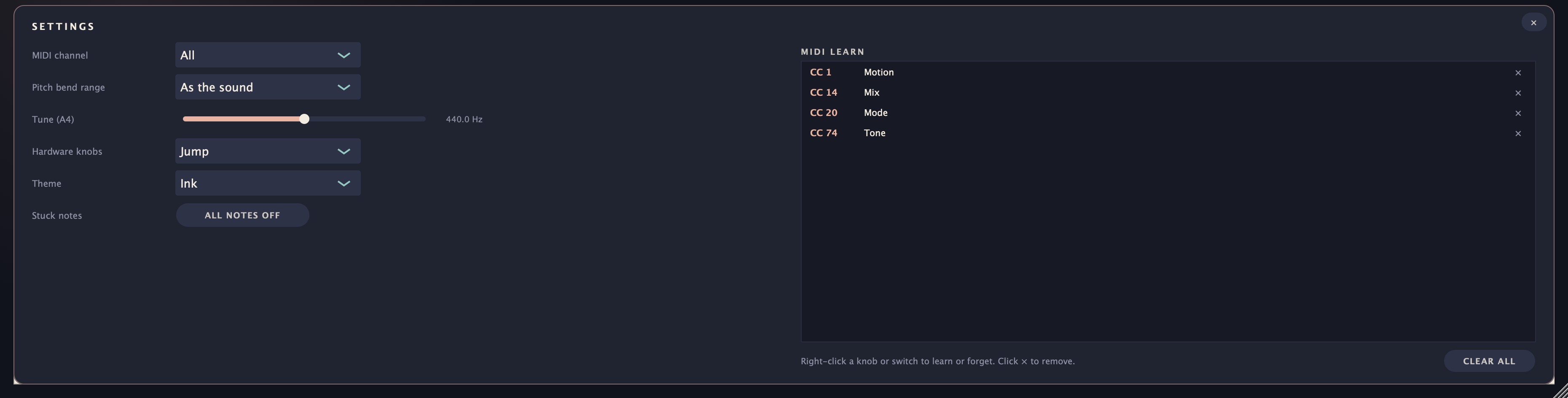
Click the gear in the top bar. Close with × in the corner.
- MIDI channel
- Which channel Stein Strings listens to. All: every channel.
- Pitch bend range
- How far the pitch wheel bends, on both layers. As the sound: the strings bend 2 semitones and layer B as its sound was made. Or a fixed ±2, 5, 7, 12 or 24 semitones.
- Tune (A4)
- Master tuning. Double-click for 440 Hz.
- Hardware knobs
- When a knob on your controller doesn't match the panel. Jump: the value jumps at once. Pickup: nothing happens until your knob passes the current value.
- Theme
- The panel colours, same as the dots by the logo.
- ALL NOTES OFF
- The same as PANIC.
- MIDI LEARN list
- Every knob you assigned and its CC number. Click × to remove one, CLEAR ALL to remove them all.
Sound recipes
Starting points to learn the panel by ear. Numbers are rough; turn until it sounds right.
Classic string machine
- Click STRINGS, MIX fully left (A).
- ENSEMBLE high, TONE around the middle.
- A short, R about 1 s, some SPACE.
- Play chords low in the keyboard.
Strings with a choir under
- Click STRINGS.
- Pick a choir or pad sound under STEIN FM.
- MIX a little left of the middle.
- B PITCH −12 for weight, or 0 to blend.
Slow ambient pad
- Click PAD, add GLASS and MOTION.
- A and R long, SPACE high.
- MIX towards B with a soft pad sound.
- MUTATE with MOVING and DARK on.
Solo lead
- Click CELLO, MODE Uni.
- BOW up for the attack, MOTION for vibrato.
- Play one line, notes slightly overlapping.
Questions
- I don't hear layer B.
- MIX is fully left (A). Turn it towards the middle.
- MUTATE doesn't change anything.
- MUTATE only changes layer B. Turn MIX up so you hear it.
- The strings come in too slowly.
- Turn A in SHAPE to the left. Layer B has its own A in LAYER B.
- A note keeps sounding.
- Press PANIC. It also clears the sustain pedal and the reverb tail.
- Chords play as single notes.
- MODE is on Mono or Uni. Switch it to Poly.
- Where are my presets?
- Open User presets and choose Show folder.
- Stein Strings sounds different from before.
- The Triple Extravaganza chain is on by default. Switch it off with the ON next to its name in the strip, or open it and set each block to taste.
- The demo went silent.
- The 14 days are over. Your projects open unchanged in the full version.